Key takeaways
- Looker Studio can extract a theme from your logo, so the report carries your agency's colors.
- Connect Search Console and GA4 with an account that has at least view access to both.
- Build three pages: summary, search performance and leads. Clients read the first one.
- A live report plus a short monthly note beats a 30-page PDF.
Why use Looker Studio for white label SEO reports?
Because it is free, updates on its own and can carry your agency's branding from top to bottom. Clients open one link and see their numbers without a login to Search Console or Analytics. For a white label partner, it also means reports stay in your template, under your name, every month.
Put your agency brand on it
In the theme panel, Looker Studio can extract a theme from an image, such as your logo, and then let you adjust fonts, colors, backgrounds and borders, according to the Looker Studio themes documentation. Add your logo to the header, use your own domain in the link you share when possible, and keep the partner's name out of every page.
Which data sources should an SEO report use?
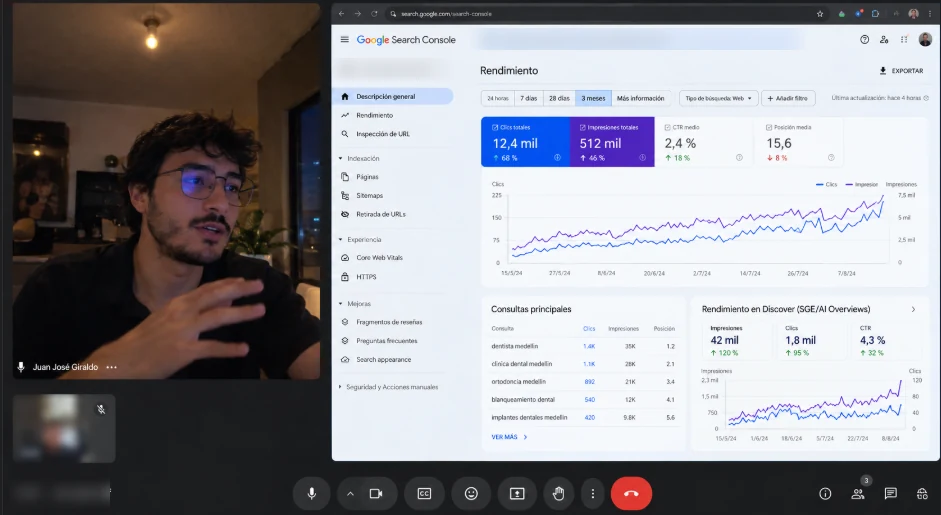
Search Console for queries, clicks, impressions and positions, and GA4 for sessions, conversions and leads. Sign in with a Google account that has at least view permission on the Search Console property. Add the client's call tracking or CRM data if leads are the main goal, so the report connects rankings to revenue.
The Search Console connector offers two tables, Site Impression and URL Impression, and each data source uses one of them, per the connector documentation. Use Site Impression for the overview and URL Impression for page-level detail. Access levels are explained in Search Console's permissions help.
Three pages clients actually read
| Page | What it shows | Question it answers |
|---|---|---|
| Summary | Leads, organic sessions and clicks vs last month and last year | Is SEO working? |
| Search performance | Top queries and pages, average position, click-through rate | What are we ranking for? |
| Work and next steps | What was done, what changed, what comes next | What am I paying for? |
Common reporting mistakes
- Too many charts. If a chart does not change a decision, remove it.
- Rankings without context. Show clicks and leads next to positions.
- No comparison. Always compare with the previous period and the same month last year.
- Silent drops. Explain a dip before the client asks about it.
The monthly narrative that goes with the dashboard is covered in white label SEO reporting, and access setup in white label SEO onboarding. Clear reports are one of the best tools against churn; see how to reduce SEO client churn, or start at the white label SEO services page.
Frequently asked questions
Is Looker Studio free?
The standard version is free to use with Google accounts.
Can clients see who built the report?
Not if the report uses your theme and logo and is shared from your agency's account.
Which access does the report need?
The account connecting the data needs at least view permission on the Search Console property and access to GA4.
How often does the data update?
It refreshes from the connected sources; Search Console data usually lags a couple of days.
Do you build reports under our brand?
Yes. Reports use your template and logo, with no partner branding.

About the author
Juan José Giraldo is a senior SEO specialist with 5+ years of experience. He works on technical and local SEO for 600+ US car dealerships and supervises the SEO of 18 US e-commerce stores. He runs White Label SEO LATAM from Medellín, Colombia, and delivers white label SEO for agencies in the US, UK, Canada and Australia. Read more · LinkedIn.